Roles and permissions for organizations#
By default, Codacy assigns each organization member a role corresponding to that member's role on your Git provider. Each Codacy role, from most restrictive (repository read) to most capable (organization admin), corresponds to a set of permissions that determine what each member can do on Codacy.
To update a member's role on Codacy, update that member's role on your Git provider. When next logging in to Codacy, the member is assigned the new role.
Organization admins can also grant additional permissions:
- To roles, by configuring repository management permissions
- To individual members, by assigning the organization manager role
To find your Codacy role, see the roles for your Git provider:
Then see what that role can do in Permissions by Codacy role.
To list and manage the members of your Codacy organization, see the Managing people page.
Configuring repository management permissions#
Only organization admins can update this setting
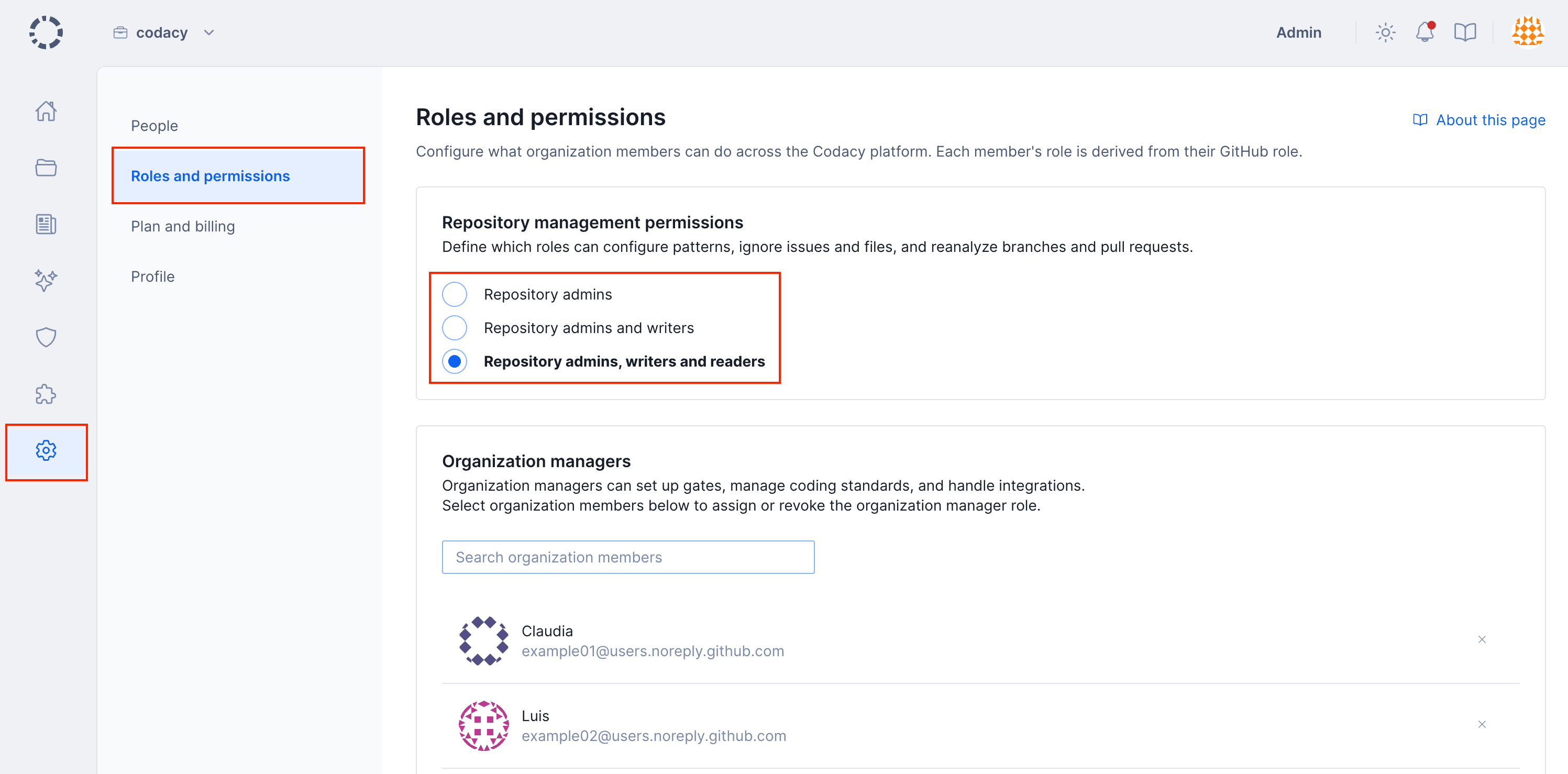
By default, only users with the Codacy role repository write can change analysis configurations.
To change this, open your organization Settings, page Roles and permissions, and choose the Codacy roles that can perform the following operations on the repositories of your organization:
Managing the organization manager role#
Only organization admins can update this setting
To grant an organization member additional permissions, you can assign that member the organization manager role. This role isn't influenced by a member's Git provider role.
To review the additional permissions granted by the organization manager role, see Organization manager.
Note
Organization managers can access the Policies and Integrations settings sections of your organization and can therefore impact some repository settings for all repositories of your organization, even repositories that they can't access on the Git provider. However, they can't access the repositories themselves and can only see the repository names.
Assigning the organization manager role#
To assign the organization manager role:
-
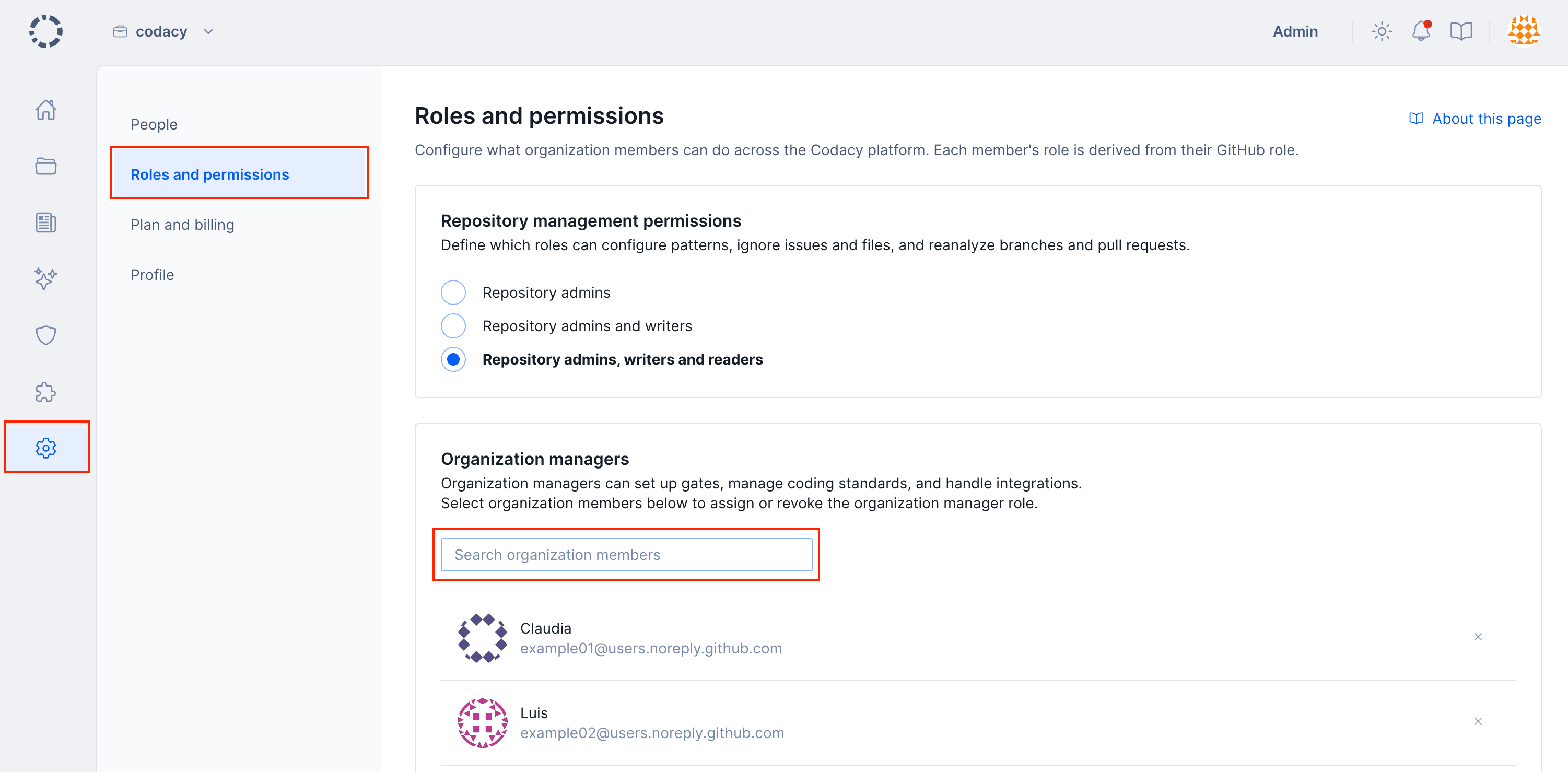
Open your organization Settings, page Roles and permissions.
-
In the Organization managers area, use the search field to find the relevant organization member and click the member's name.
Note
You can only assign the organization manager role to members of your organization.
Revoking the organization manager role#
To revoke the organization manager role:
-
Open your organization Settings, page Roles and permissions.
-
In the Organization managers area, scroll the list to find the relevant user.
-
Click the Revoke role icon to the right of the user's name and confirm.
Permissions for GitHub#
The following GitHub Cloud and GitHub Enterprise roles map to these Codacy roles:
| GitHub role | Codacy role |
|---|---|
| Outside collaborator1 | Not supported as a Codacy role |
| Repository read, Repository triage | Repository read |
| Repository write, Repository maintain | Repository write |
| Repository admin | Repository admin |
| — (assigned directly on Codacy) | Organization manager |
| Organization Owner | Organization admin |
1: Outside collaborators aren't supported as members of organizations on Codacy. You can still add outside collaborators to Codacy so that Codacy analyzes their commits to private repositories, but they won't be able to join your Codacy organization.
Permissions for GitLab#
The following GitLab Cloud and GitLab Enterprise roles map to these Codacy roles:
| GitLab role | Codacy role |
|---|---|
| External user1 | Not supported as a Codacy role |
| Project guest, Project reporter | Repository read |
| Project developer | Repository write |
| Project maintainer, Project owner | Repository admin |
| — (assigned directly on Codacy) | Organization manager |
| Group owner, Administrator | Organization admin |
1: External users aren't supported as members of organizations on Codacy. You can still add external users to Codacy so that Codacy analyzes their commits to private repositories, but they won't be able to join your Codacy organization.
Permissions for Bitbucket#
The following Bitbucket Cloud and Bitbucket Server roles map to these Codacy roles:
| Bitbucket role | Codacy role |
|---|---|
| Read, Write1 | Repository read |
| — (assigned directly on Codacy) | Organization manager |
| Admin | Organization admin |
Bitbucket has no role that maps to Repository write or Repository admin.
1: Codacy can't distinguish the Bitbucket roles Read and Write because of a limitation on the Bitbucket API.
Permissions by Codacy role#
The table below compares what each Codacy role is allowed to do. These permissions are the same regardless of Git provider—see Permissions for GitHub, Permissions for GitLab, or Permissions for Bitbucket to find your Codacy role.
| Operation | Repository read | Repository write | Repository admin | Organization manager | Organization admin |
|---|---|---|---|---|---|
| Join organization | Yes1 | Yes1 | Yes1 | Yes | Yes1 |
| View and follow private repository | Yes | Yes | Yes | Yes | Yes |
| Access Security and risk management | Yes2 | Yes2 | Yes2 | Yes | Yes |
| Access AI Risk Hub Overview | Yes | Yes | Yes | Yes | Yes |
| Access AI Risk Hub AI assets and Tools & workflows | No | No | No | Yes | Yes |
| Ignore issues and files, configure code patterns, reanalyze branches and pull requests | Configurable | Configurable | Yes | Inherits original permission | Yes |
| Upload coverage using an account API token, see the coverage report logs | No | Yes | Yes | Inherits original permission | Yes |
| Configure repository Git provider integration settings | No | No | Yes | Inherits original permission | Yes |
| Configure repository quality gates and goals | No | No | Yes | Inherits original permission | Yes |
| Configure repository to run analysis on a local build server, manage repository API tokens | No | No | Yes | Inherits original permission | Yes |
| Add and remove repository | No | No | Yes3 | Inherits original permission | Yes |
| Manage organization gate policies and coding standards | No | No | No | Yes | Yes |
| Configure organization default settings for Git provider integration | No | No | No | Yes | Yes |
| Obtain audit logs for organization events4 | No | No | No | Yes | Yes |
| Invite and accept members, modify billing | No | No | No | No | Yes |
| Assign and revoke the organization manager role | No | No | No | No | Yes |
1: Joining an organization may need an approval depending on your setting for accepting new people.
2: These users can only see security items originating from Codacy repositories that they follow.
3: On GitHub, requires that an organization owner has given the Codacy GitHub App access to the repositories to add or remove.
4: Audit logs are available only on Business plan.
See also#
Was this page helpful?
Your feedback helps us improve the documentation.
255 characters left
Thanks for helping improve Codacy documentation.
For more detailed feedback, open an issue on GitHub.